
In the side menu, select Team Planner.
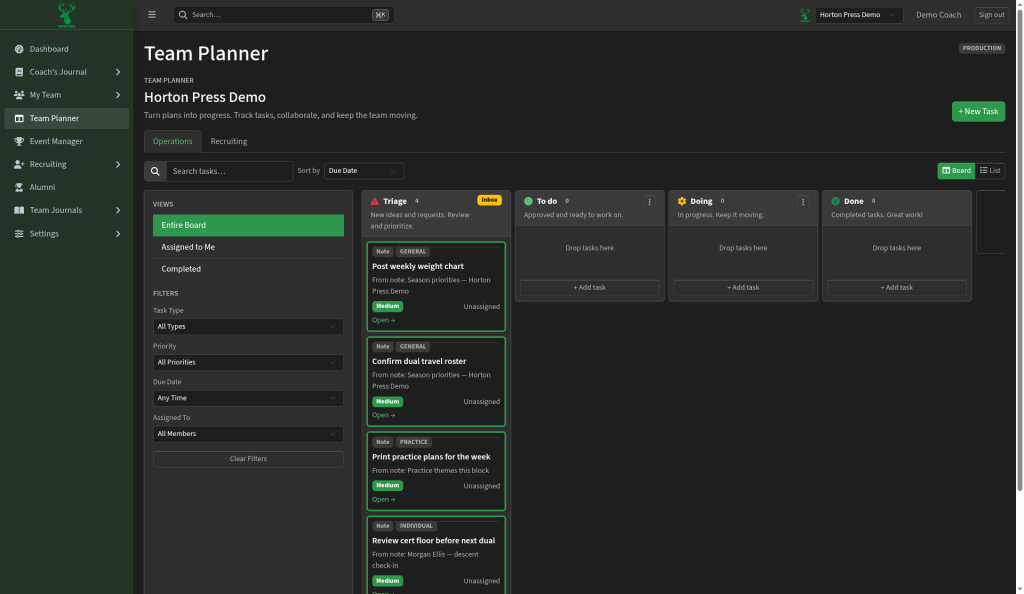
The boards
- Operations: day-to-day team jobs.
- Recruiting: your recruiting pipeline.
The columns
- Triage: new cards waiting to be sorted, marked Inbox.
- To do: ready to work on.
- Doing: in progress.
- Done: finished.
Drag a card to move it. Select + Add column to add your own column.
Views and filters
On the left, under Views:
- Entire Board
- Assigned to Me
- Completed
Under Filters, narrow by Task Type, Priority, Due Date and Assigned To.
At the top, search with Search tasks…, change Sort by, or switch between Board and List.