
Roster
Roster is your list of active athletes. You can organize them into groups (like JV and Varsity), add people one at a time or in bulk, and import or export a spreadsheet.
How to open it
In the side menu, open My Team, then select Roster.
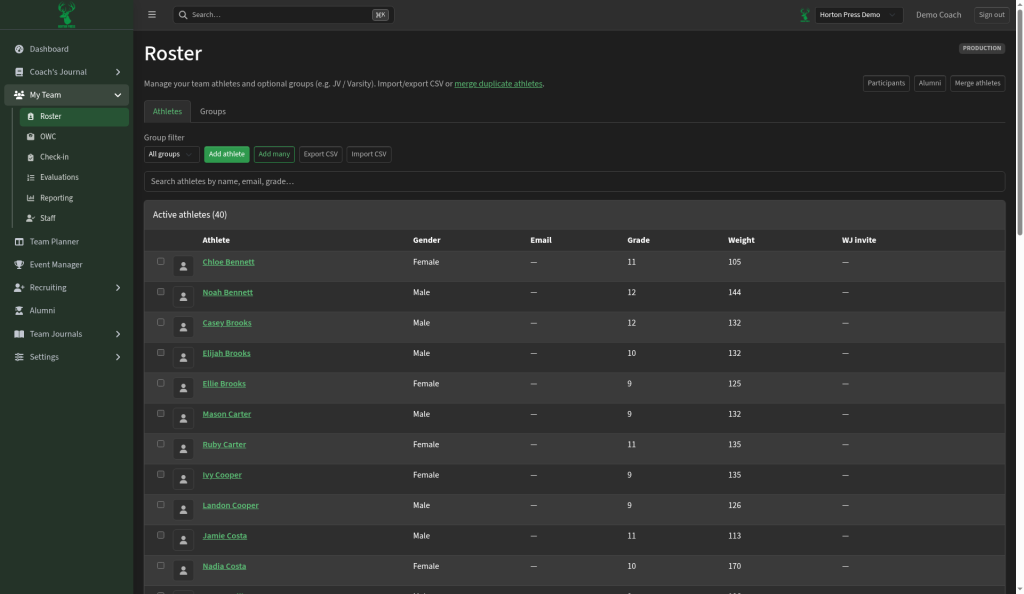
Tabs
- Athletes — everyone on the active roster
- Groups — optional groups such as Varsity or JV
What you can do
- Search by name, email, or grade.
- Filter by group.
- Add athlete — add one person.
- Add many — enter several athletes at once.
- Export spreadsheet (CSV) / Import from a spreadsheet — move roster data in or out.
- Merge athletes — combine duplicate records when the same person was entered twice.
- Open Alumni to review athletes who left the active roster.
- Use Participants when you need the list of who is signed up for a practice or event (for example before taking attendance).
Athlete list
The table shows name, gender, email, grade, weight, and related invite status. Select an athlete’s name to open their record.