
Curriculum
Curriculum is your team’s technique library. You organize teaching from big picture down to the finish.
How to open it
In the side menu, open Coach's Journal, then select Curriculum.
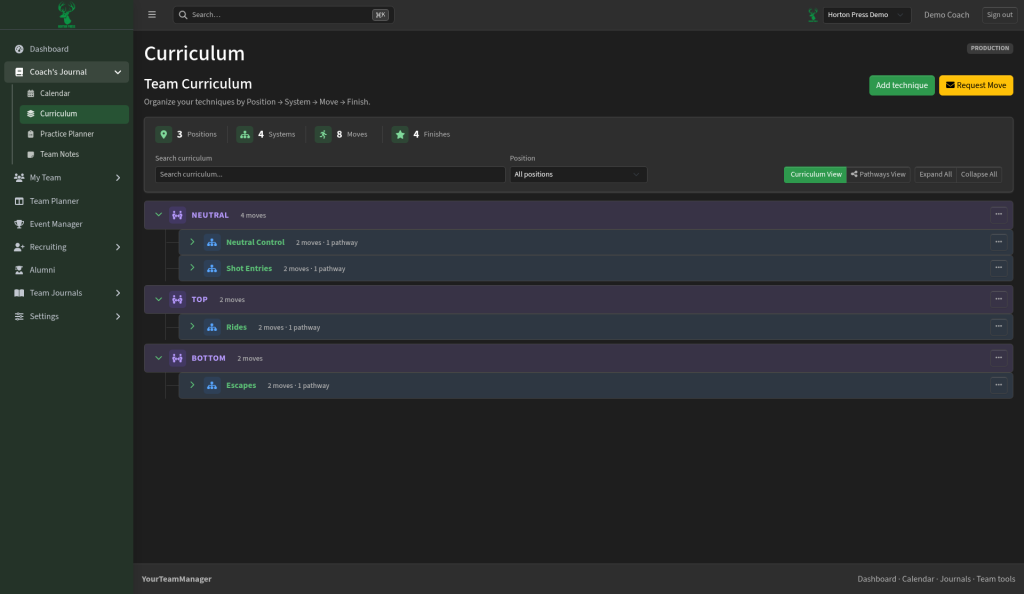
How techniques are organized
Everything is grouped in this order:
- Position — for example Neutral, Top, or Bottom
- System — a family of work under that position (like Shot Entries or Escapes)
- Move — the specific technique
- Finish — how the move ends
Counts at the top show how many positions, systems, moves, and finishes you have.
What you can do
- Search the curriculum or filter by position.
- Expand All / Collapse All to open or close the full list.
- Switch between Curriculum View (the full list) and Pathways View (how techniques connect into teaching paths).
- Select Add technique to add something new.
- Use Request Move when you want a move reviewed or added through your team’s request flow.
Tips
- Start with clear positions and systems before adding lots of moves — the list stays easier to browse.
- Pathways help when you want athletes to see a progression, not just a flat list of moves.